ActivitiesCache.db-wal: Why the WAL File Matters
How SQLite write-ahead logging hides the newest Windows Timeline activity in ActivitiesCache.db-wal, how checkpoints work, and how to parse the WAL safely.
TL;DR. ActivitiesCache.db is in SQLite WAL mode: committed changes go to ActivitiesCache.db-wal and reach the main file only at a checkpoint (by default when the WAL reaches 1,000 pages). On a live or recently used system, the newest activity is often only in the WAL. Collect both files at the same instant, never open the originals with a normal SQLite client, and use a parser that replays committed frames and tells you which rows came from the WAL.
If you remember one thing from this series, make it this: a Windows Timeline without its WAL is a Timeline that stops early. And "early" is usually "just before the incident", because the incident is recent.
How write-ahead logging works
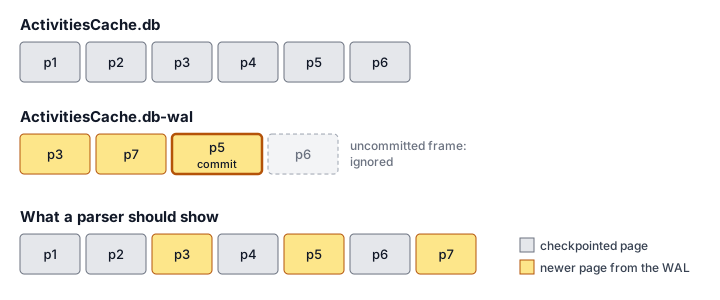
SQLite's write-ahead log inverts the classic journal. Instead of copying original pages aside and writing changes into the database, SQLite leaves the database untouched and appends changed pages to a separate -wal file. A transaction is committed when its commit record is appended to the WAL (sqlite.org/wal.html).
Readers look for each page in the WAL first, then fall back to the database file. Moving pages back into the database is called a checkpoint. By default, SQLite runs one automatically when a commit pushes the WAL past 1,000 pages (sqlite.org). kacos2000 made the same observation for this database and noted a 4,096-byte page size in the files he examined (kacos2000).
What this means for Timeline:
| Situation | Where the latest rows are |
|---|---|
| User active, WAL below the checkpoint threshold | Only in the WAL |
| Checkpoint just ran | In the database; the WAL may be reset and reused |
| Last connection closed cleanly | Checkpointed; "usually" the WAL is deleted (sqlite.org) |
| Crash, power loss, pulled plug | WAL may be retained on disk with committed but uncheckpointed transactions (sqlite.org) |
A Timeline row is not only inserted once. A focus session (type 6) is updated as it continues: its EndTime and activeDurationSeconds grow. Those updates also land in the WAL first. So the WAL affects not just which rows exist but what they say.
Inside the WAL file
The format is documented in the SQLite file format specification:
| Structure | Size | Fields that matter |
|---|---|---|
| WAL header | 32 bytes | Magic, page size, checkpoint sequence, salt-1, salt-2, checksum |
| Frame header | 24 bytes | Page number, database size after commit (non-zero only on commit frames), salts, cumulative checksum |
| Frame body | one page | The new version of that database page |
A frame is valid only if its salts match the header and its cumulative checksum is correct. A frame with a non-zero "database size" field is a commit frame: it closes a transaction. Frames after the last commit frame belong to a transaction that never committed and must be ignored (sqlite.org).
After a checkpoint, when the next writer resets the WAL, "salt-1 value is incremented and the salt-2 value is randomized", which invalidates the old frames. The file "can optionally be truncated on a reset, but it need not be" (sqlite.org). That sentence is the forensic opportunity: frames from earlier generations can still be sitting past the current ones.
Why a normal SQLite client is the wrong tool
Opening ActivitiesCache.db in a standard SQLite library works, and it even reads the WAL for you if the file sits next to the database. The problem is what happens next. "When the last connection to a database closes, that connection does one last checkpoint and then deletes the WAL and its associated shared-memory file" (sqlite.org/wal.html).
In other words, the act of looking can rewrite the database and destroy the WAL, including any stale frames that held older data. Rules of thumb:
- Hash the originals, then work on copies.
- If you must use a SQLite client, open a copy, or use read-only / immutable modes on a copy you do not care about.
- Prefer a parser that reads the bytes itself and never writes.
How the Windows Timeline Parser handles the WAL
The Windows Timeline Parser ships its own read-only SQLite reader, written in Rust and compiled to WebAssembly. It does not embed a SQLite engine and has no code path that writes. With the WAL, it:
- Validates the WAL header magic, page size and header checksum.
- Walks frames while salts match and the cumulative checksum holds.
- Overlays the last committed version of each page on the database; frames of an uncommitted transaction are counted and ignored.
- Parses the result, then parses the database without the WAL, and compares row by row.
- Marks each row only in WAL (new since the last checkpoint) or changed in WAL (the database holds an older version).
It also guards against a classic mistake: a -wal from a different database. Nothing in the file format ties a WAL to its database, so a WAL with the same page size would be applied silently by a naive reader. The tool checks that the replayed database is still a plausible Timeline and, if not, ignores the WAL with a warning.
The row flags turn "the WAL matters" from theory into triage. Filter on Only in WAL and you are looking at the activity that happened since the last checkpoint, which on a seized-live machine is often the last hours before collection.
What the WAL can hold that nobody shows you
Three kinds of data can survive in or around the WAL:
| Data | Where | Parsed by this tool today? |
|---|---|---|
| Committed, uncheckpointed rows | Current WAL frames | Yes |
| Uncommitted transaction | Frames after the last commit | Counted, ignored (by design) |
| Older page versions | Frames from a previous salt generation | No (reported, not carved) |
| Deleted rows | Freeblocks and freelist pages in the database | No |
Research on SQLite recovery, such as the bring2lite work presented at DFRWS, shows that deleted records can be recovered from these structures (Meng and Baier, 2019). kacos2000's clipboard carver reports recovering deleted clipboard entries from both the database and the WAL (kacos2000/WindowsTimeline). If your case hinges on deleted Timeline data, work on a copy with a carving tool, and document the method separately from the live-record timeline.
Checklist
-
ActivitiesCache.dbandActivitiesCache.db-walcollected from the same instant (acquisition guide). - Originals hashed; analysis only on copies.
- Parser reports how many frames were committed, how many ignored, and why it stopped.
- Report distinguishes WAL-only rows from checkpointed rows.
- Stale WAL frames and free pages preserved for carving if deletion is in scope.
FAQ
What is ActivitiesCache.db-wal?
It is the SQLite write-ahead log of the Windows Timeline database. Committed changes are appended there first and copied into ActivitiesCache.db only at a checkpoint, so the WAL often holds the most recent activity.
Is it safe to open ActivitiesCache.db in DB Browser for SQLite?
Only on a copy. A normal SQLite connection reads the WAL next to the database and may checkpoint it into the main file and delete it when the last connection closes, which alters the files.
Can the WAL contain deleted activity?
It can. Old frames from earlier WAL generations are invalidated by a salt change but not necessarily overwritten, so they may hold earlier page versions. Recovering them needs carving tools; most parsers ignore them.